AI writing tools have become part of everyday work for bloggers, marketers, students, freelancers, and business owners. Two of the biggest names are ChatGPT and Gemini.
Both can help you write articles, emails, social media posts, outlines, product descriptions, summaries, and many other types of content. But if you are trying to decide which one is actually better for writing, the answer is not as simple as choosing one tool and declaring it the winner.
I tested ChatGPT Vs Gemini For Writing across several common writing tasks to see how they approached the same type of work. My goal was not to find a winner based only on marketing claims or a list of features. I wanted to look at the practical side: how easy the tools were to use, how well they followed instructions, the quality of their first drafts, and how much editing I felt the output needed.
The biggest thing I learned is that the “best” AI writing tool depends heavily on what you are writing.
ChatGPT vs Gemini For Writing: The Short Answer
If I had to give a quick answer, I would say this:
ChatGPT felt particularly useful when I wanted to develop an idea, improve wording, continue refining a draft, or give detailed instructions about style and structure.
Gemini felt useful for generating alternative perspectives, handling certain information-focused tasks, and working within its wider ecosystem.
However, neither tool should be treated as a replacement for human judgment.
Both can misunderstand instructions. Both can produce generic writing. Both can occasionally provide inaccurate information. And both can make a weak article sound confident.
That is why the quality of your prompt and your editing process still matter.
How I Compared ChatGPT and Gemini
To make the comparison practical, I looked at common writing tasks rather than focusing only on technical specifications.
I compared the tools based on:
- Following writing instructions
- Creating article outlines
- Writing introductions
- Expanding sections
- Rewriting text
- Maintaining a consistent tone
- Generating ideas
- Editing and simplifying content
- Handling follow-up instructions
- The amount of editing the draft appeared to need
I used similar instructions for each task and focused on the usefulness of the output rather than expecting identical wording.
It is also worth remembering that AI models and features can change over time. Results from one version or test may not remain the same forever.
Test 1: Creating an Article Outline
The first task was to create an outline for a practical article.
A good outline should do more than produce a list of headings. It should organize the topic in a logical order and help the writer understand what information needs to be covered.
When using AI for this type of task, I generally prefer to give the tool some context.
For example, instead of saying:
Write an article about WordPress.
I would give a clearer instruction:
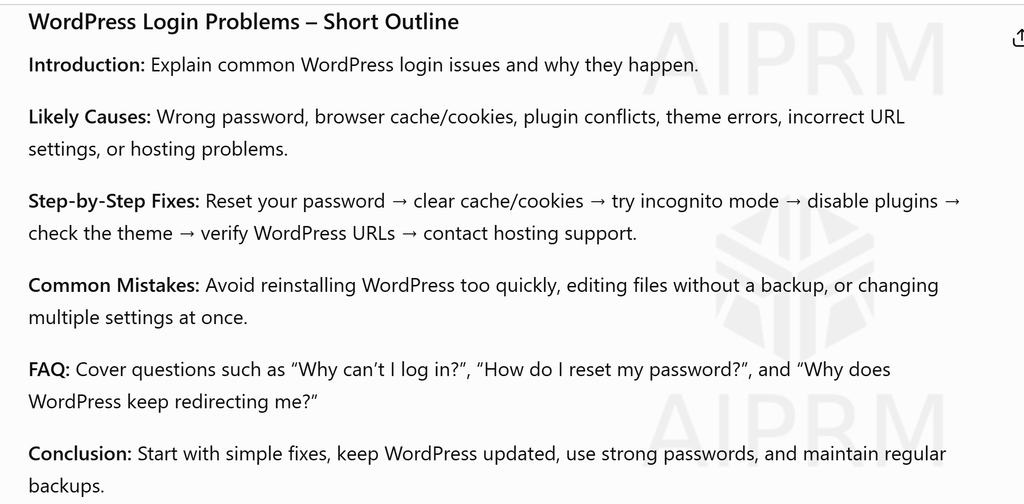
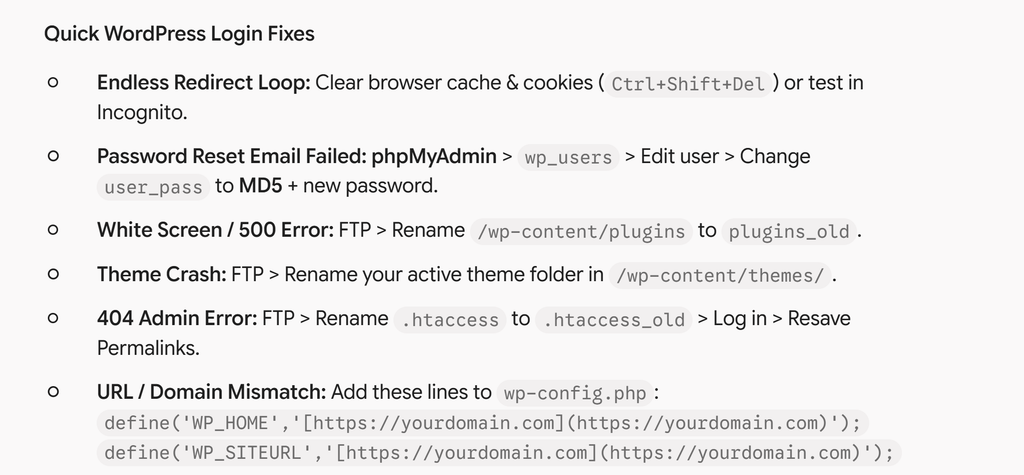
Create a detailed outline for a beginner-friendly article explaining how to fix common WordPress login problems. Include the likely causes, step-by-step solutions, common mistakes, and a short FAQ. Avoid unnecessary filler.
This type of prompt gives the AI a clear purpose and audience.
Both ChatGPT and Gemini were capable of producing a usable structure. The difference I noticed was less about whether they could create headings and more about how I could continue refining the outline.
For ChatGPT The result come here
For result of Gemini Result
For longer writing projects, the ability to say things such as:
Make this section more practical.
or:
Remove the generic headings and focus on problems beginners actually face.
is extremely useful.
My advice is not to accept the first outline from either tool immediately. Treat it as a starting point.
Read the outline and ask yourself:
- Does it answer the real search intent?
- Are important questions missing?
- Is the structure logical?
- Are some headings only there to make the article longer?
A shorter, more useful outline is often better than an article structure filled with unnecessary sections.
Test 2: Writing an Introduction
The introduction is one area where AI can easily become repetitive.
Many AI-generated introductions follow a predictable pattern:
In today’s digital world…
or:
In the fast-paced world of technology…
These phrases are not always wrong, but they can make different articles sound as if they were written using the same template.
For my comparison, I focused on whether each tool could write a direct introduction when given clear instructions.
For example:
Write a natural introduction for an article comparing ChatGPT and Gemini for writing. Start with the problem a writer faces when choosing between the two tools. Avoid phrases such as “in today’s digital world” and do not make exaggerated claims.
This is where detailed prompting becomes important.
Both tools can produce a reasonable introduction, but I found that the quality improved significantly when I explained what I did not want.
That is an important lesson for anyone using AI for content.
Do not just tell the AI what to write. Also tell it:
- What to avoid
- Who the reader is
- What tone you want
- How detailed the answer should be
- Whether you want examples
- Whether you want the writing to sound formal, conversational, or technical
The better your instructions, the less time you may spend fixing a generic first draft.
Test 3: Following a Specific Writing Style
This was one of the most important parts of my comparison.
Most people do not simply want an article. They want an article written for a particular audience.
A beginner-friendly WordPress tutorial should not sound like technical documentation. A software comparison should not sound like an academic paper. A business email should not read like a casual blog post.
I tested how well the tools could adapt when given a specific style.
For example:
Rewrite this section for beginners. Use short paragraphs, simple English, practical examples, and a conversational tone. Do not oversimplify technical terms if they are necessary.
This type of instruction is more useful than simply saying:
Make it human.
The phrase “write like a human” is too vague.
Human writing can be formal, technical, humorous, simple, persuasive, personal, or highly detailed. AI needs more direction than that.
In my experience, the best results from either tool came when the instructions were specific.
Instead of asking:
Make this better.
Try:
Keep the meaning the same, but remove repetition, shorten long sentences, and make the explanation easier for a beginner to understand.
That gives the tool a real editing task.
Test 4: Improving an Existing Draft
One of the most useful ways to use AI is not necessarily to generate an entire article from scratch.
I found that AI can be more useful when you already have:
- Your own experience
- A rough draft
- Notes
- Research
- Screenshots
- An example from your actual work
You can then use the AI to help organize and improve that material.
For example, if you have written:
I had this WordPress problem and first I tried clearing the cache but it did not work. Then I checked the plugin and found that after the update the problem started.
You can ask the AI:
Keep this based on my experience, but improve the grammar and organization. Do not add events or claims that I did not mention.
This is a much safer and more useful workflow than asking an AI to invent a personal experience.
Both ChatGPT and Gemini can assist with rewriting, but you should carefully compare the result with your original text.
Sometimes AI editing can accidentally remove important details or change the meaning.
For this reason, I never recommend blindly replacing your original text with the AI version.
Test 5: Handling Follow-Up Instructions
Writing an article is rarely a one-prompt process.
You may start with an outline and then decide:
- The introduction is too long.
- One section needs more examples.
- The tone is too formal.
- A heading is unnecessary.
- The explanation needs to be simpler.
The ability to continue working on the same piece of content is important.
A useful workflow might look like this:
First prompt:
Create an outline for this topic.
Second prompt:
Keep the outline, but add a section about common mistakes.
Third prompt:
Now write only the introduction. Keep it under 150 words.
Fourth prompt:
Rewrite the introduction using simpler language.
Breaking the task into smaller stages gives you more control.
Trying to generate a 2,000-word article with one short prompt may save time initially, but it often creates more editing work later.
For long-form content, I prefer a section-by-section approach.
Test 6: Generating Ideas
Both ChatGPT and Gemini can be useful when you are stuck.
For example, you may know that you want to write about Excel but do not know which problems to target.
Instead of asking:
Give me 100 Excel keywords.
Try something more useful:
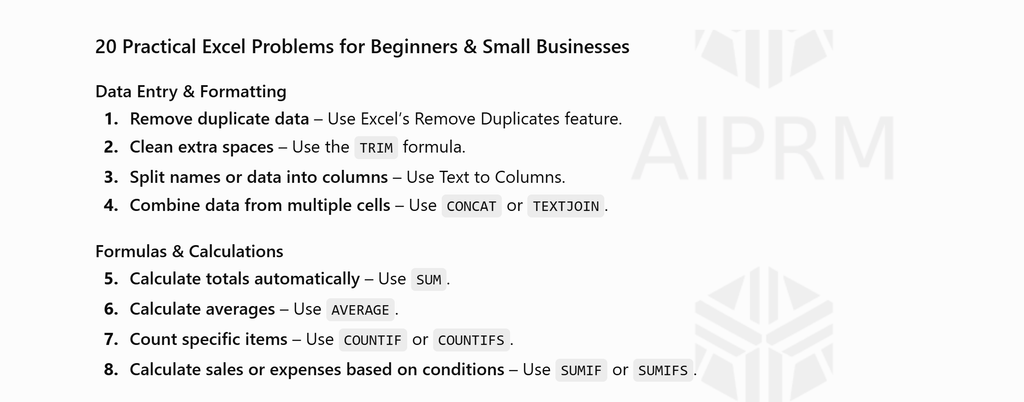
List 20 practical Excel problems that beginners and small businesses commonly face. Focus on problems that can be solved with a formula, feature, or step-by-step process. Group similar ideas together.
For Gemini Result

For ChatGPT The result is
This gives you article ideas based on problems rather than simply generating a random keyword list.
AI-generated ideas still need evaluation.
Before writing an article, ask:
- Is this a real problem?
- Can I add useful information?
- Is the topic relevant to my website?
- Do I have experience, examples, or a useful angle?
An AI tool can generate 100 ideas in seconds. That does not mean all 100 ideas deserve an article.
Test 7: Editing and Simplifying Writing
This was another area where both tools were useful.
AI can help identify:
- Repetitive sentences
- Overly complicated wording
- Long paragraphs
- Unclear explanations
- Awkward transitions
For example, you can paste a section and ask:
Edit this for clarity. Keep my tone and meaning, but make it easier to read. Show me what you changed and explain why.
This is often more useful than simply asking the AI to rewrite everything.
You remain in control of the final article.
For a website such as TechTaskLab, clarity is especially important. A reader who is trying to fix an Excel formula or WordPress error usually does not want unnecessary storytelling or complicated language.
They want to understand:
- What caused the problem?
- What should I do?
- What happens if the first solution does not work?
AI can help improve the explanation, but the final answer still needs to be accurate.
Where ChatGPT Was Most Useful for Me
For my writing workflow, ChatGPT was particularly useful when I wanted to work through a draft in multiple steps.
For example:
- Brainstorming an angle
- Creating a structure
- Expanding a specific section
- Rewriting awkward sentences
- Generating examples
- Explaining complex information more simply
- Continuing to refine the same piece of writing
The biggest advantage is not simply pressing a button and receiving a complete article.
The more useful part is the conversation and iteration.
You can keep asking:
This is too generic. Make it more practical.
or:
Add an example, but do not invent statistics.
or:
Rewrite this for someone who has never used Excel before.
That iterative process can produce a better result than relying on a single prompt.
Where Gemini Was Most Useful for Me
Gemini was also useful as a second perspective.
When working on content, it can be helpful to ask another AI tool the same question and compare the responses.
One tool may suggest a structure or explanation that the other did not consider.
For example, you could ask both tools:
What information would a beginner need before trying to fix a WordPress database connection error?
Then compare the answers.
You may find useful points from both responses.
This does not mean you should combine everything automatically. You still need to decide which information is accurate, relevant, and useful for your reader.
ChatGPT vs Gemini: My Comparison
| Area | ChatGPT | Gemini |
| Article outlines | Very useful for iterative planning | Useful for generating alternative structures |
| First drafts | Can produce detailed drafts with clear instructions | Can produce useful drafts with clear context |
| Rewriting | Useful for refining tone and structure | Useful for alternative wording and perspectives |
| Follow-up editing | Strong for multi-step refinement | Useful, especially when revisiting the task with clear instructions |
| Idea generation | Good for brainstorming and expanding concepts | Good for generating alternative angles |
| Final accuracy | Must be checked | Must be checked |
| Human review | Essential | Essential |
The most important point is that neither tool automatically produces a finished article that should be published without review.
Which One Is Better for Blog Writing?
If your main workflow involves writing articles, I would not choose a tool based only on which one can produce the longest first draft.
A long article is easy for AI to generate.
A useful article is harder.
For blog writing, I would choose the tool that helps you:
- Develop your own ideas
- Improve your workflow
- Understand a topic
- Organize your research
- Edit your writing
- Create clearer explanations
For my workflow, I found ChatGPT particularly useful as an interactive writing assistant because I could work through a piece of content step by step.
Gemini can still be valuable, particularly as another tool for brainstorming and comparing approaches.
A Better Workflow Than Using One AI Tool
You do not have to choose only one tool for every task.
A practical workflow could look like this:
Step 1: Start With the Real Problem
Choose a topic based on a question your readers actually have.
For example:
How do I extract a domain name from a full URL in Excel?
Step 2: Use AI to Build an Outline
Ask ChatGPT or Gemini to suggest a structure.
Then edit the structure yourself.
Step 3: Add Your Own Experience
Include:
- Your screenshots
- Your examples
- Problems you encountered
- Methods you tested
- Explanations based on your actual workflow
Step 4: Use AI to Improve Specific Sections
Instead of generating everything at once, ask for help with individual sections.
Step 5: Check the Facts
Verify formulas, software features, instructions, pricing, policies, and technical information.
Step 6: Edit Before Publishing
Read the article from the perspective of your audience.
Ask:
Would this actually help someone solve the problem?
If the answer is no, the article needs more work.
My Final Verdict
After comparing ChatGPT and Gemini for common writing tasks, I do not think there is a universal winner for every writer.
Both tools can help you create outlines, generate ideas, write drafts, and improve existing content.
For my own workflow, ChatGPT was the tool I would be more likely to use for iterative writing, refining instructions, and improving an article section by section.
Gemini remained useful as a second opinion and an alternative source of ideas and approaches.
The bigger lesson, however, is that your writing quality should not depend entirely on which AI tool you choose.
A weak prompt can produce weak content from any AI.
A detailed prompt, real examples, careful editing, fact-checking, and your own experience can significantly improve the final article.
If you run a website such as TechTaskLab, I would use AI as a writing assistant rather than an automatic publishing machine.
Let the AI help you with the difficult parts of the process, but keep control of the article yourself.
The best content is not simply content that sounds human. It is content that gives the reader something genuinely useful: a clearer explanation, a tested method, a practical example, or an answer they could not easily get from another generic page.
That is ultimately more important than whether ChatGPT or Gemini writes a slightly better first draft.
1 thought on “ChatGPT vs Gemini for Writing My Real Test 2026”